When I set out to make PlantPal, I envisioned it to be an app for three things about your plants: an organization tool, a to-do list, and a photo album. The value proposition was simple: you can get three separate apps for each component, but PlantPal has it in one place.
Now, I’m taking it from another angle: can I make each component 10x better than a generic solution? In other words, by specializing the to-do list around gardening, can I make it 10x better than an all-purpose to-do list?
PlantPal 2026.4 is the first step towards that goal, and here are some highlights.
Workflow for Gardening
Gardening tasks are a lot about logistics, especially when you have dozens of plants in your care. PlantPal’s to-do list is designed for just that: a structure that helps you blaze through dozens of tasks with ease.
See what’s due today
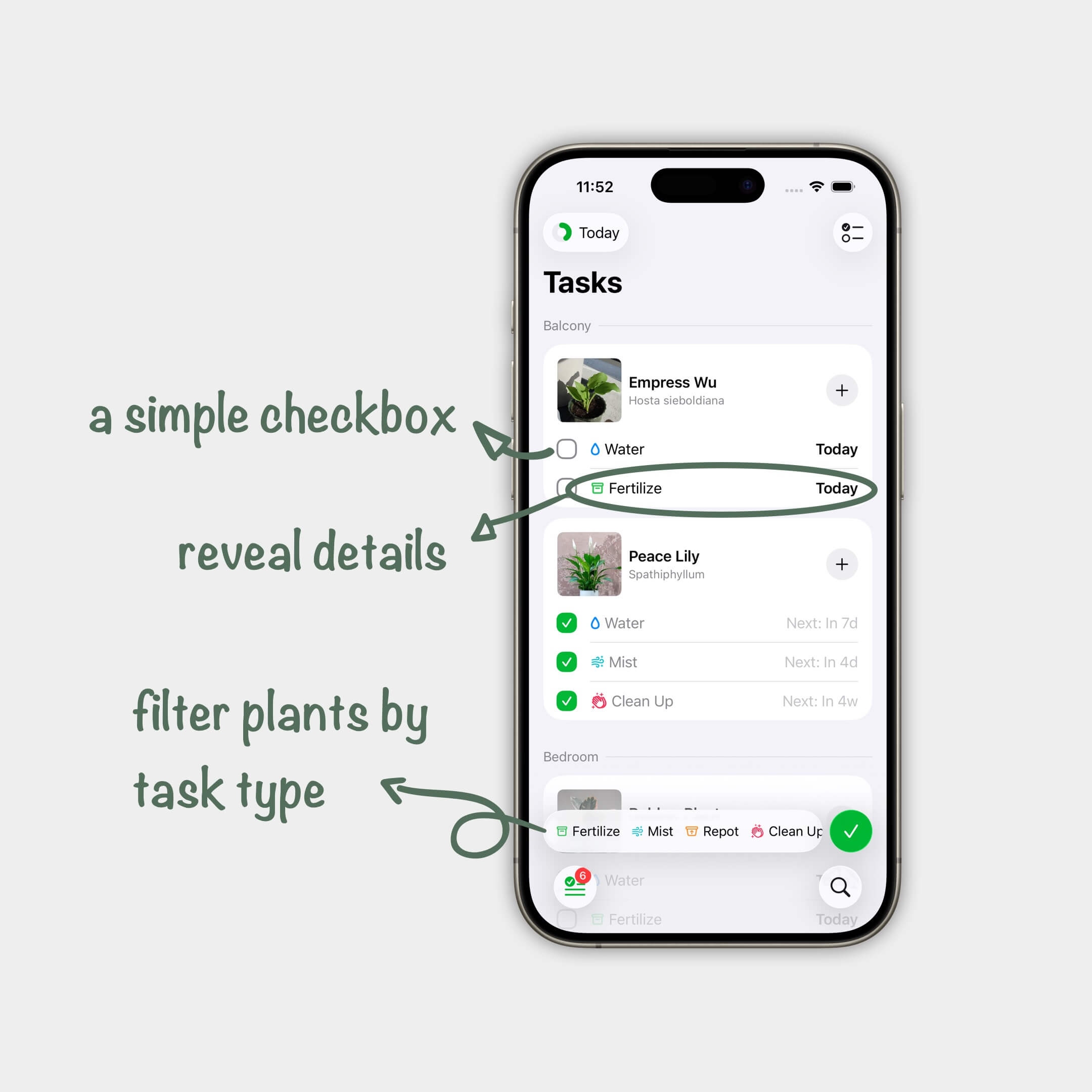
The new task list now has a toolbar at the bottom that shows you what types of tasks are due for the day: Is it a day just about watering, or should I put the fertilizer out? Now you know at a glance.
Inside the toolbar, you can tap on a task type, say Fertilize, and see only plants that need fertilizing today. This helps you get things done your way: fertilize and water these plants first (many green thumbs use water-soluble fertilizers), and water other plants after.
Hide plants that you’re done with
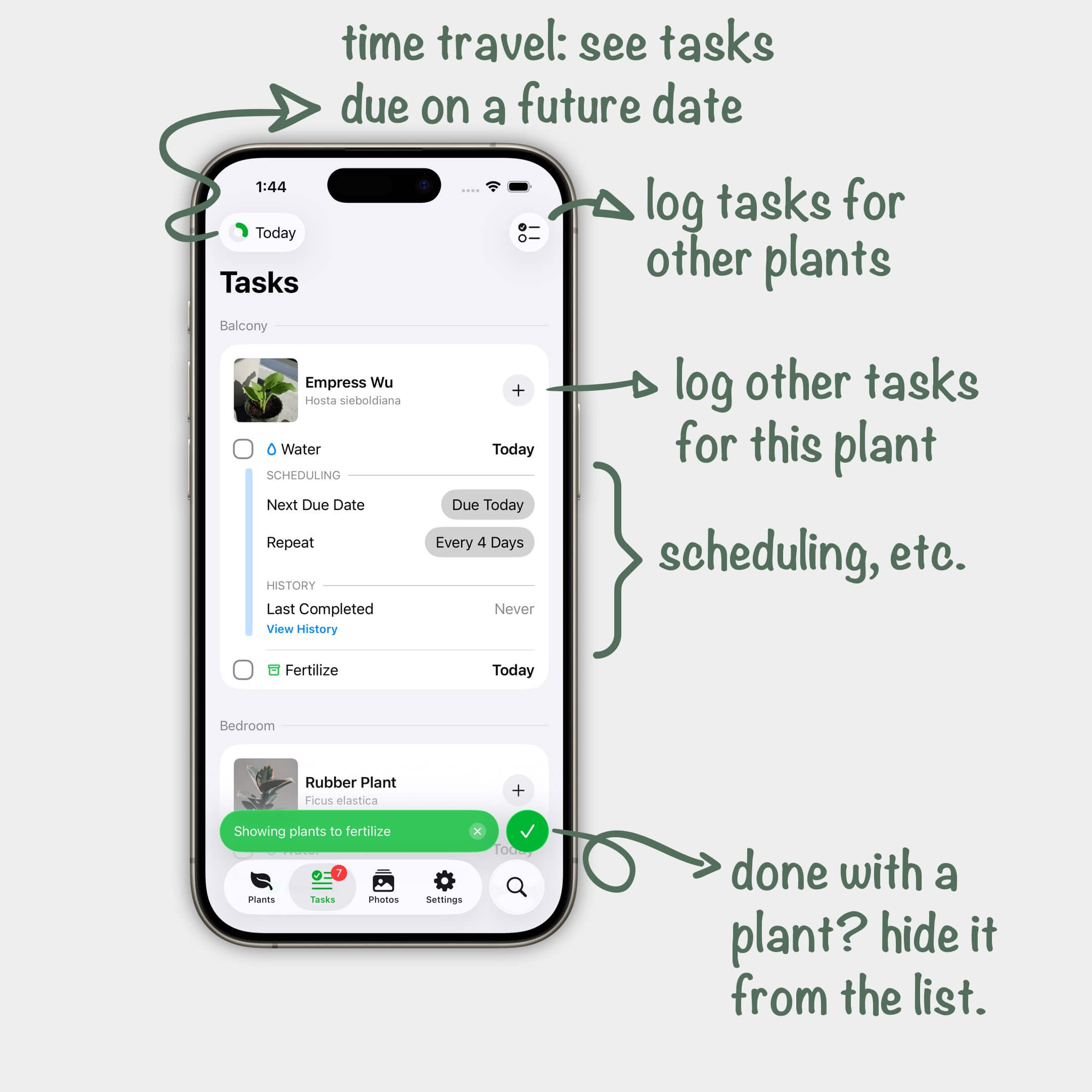
Once you’ve done with all tasks for a plant, you can hide them from the list. This can gradually shorten your to-do list and give you a great sense of progress. As your list grows shorter, the toolbar updates with only remaining task types.
When your list is cleared, you shall see a message that congratulates you for the good work. That’s some feel-good vibes!
Log an off-the-schedule task
We’ve all done this: you are watering the plant and saw some dead leaves, and you just did some nipping and cleaning. Now you can log the task easily, by tapping the plus button.
Clean and Compact Design
I put a lot of thoughts into the design of the to-do list, and drew inspiration from industry-leading apps.
Restrained use of colours
Since Version 1, PlantPal has used colour-coded tasks — blue for watering, green for fertilizing, etc. The colours have proven useful: they tell you what to expect for the day at a glance. But they haven’t aged well, and the profuse application can cause confusion and disorientation.
In the new design, I’m keeping the colour codes, but have put heavy restraints on their use. You’ll see a coloured symbol in the toolbar and in pop-up menus, but I’m not colouring the entire task row.
Progressive disclosure
Progressive disclosure is a fancy term for the art of hiding complexity. At the minimum, you’ll see a checkbox, the task name, and the due date — those are everything you need to know and act on, 98% of the time.
Expand the task and you’ll reveal more options, such as to snooze the task, update its schedule, and see detailed history.
This design pattern also opens up possibilities for more advanced scheduling options in the works, but I’ll save those for another day.
With the new design, PlantPal is taking the first step towards a 10x better to-do list. I’m keeping features that people love, including:
- Time travel: see tasks due on a future date — perfect for when you need to step away from home for a short while.
- Smart snoozing: postpone the task and remove it from the day.
- Work Days: see tasks that are due soon, so that you can complete your work in one go.
I hope you’ll enjoy this update as much as I had fun making it. Do you think it helps you better in the garden? What other features do you use? Let me know!