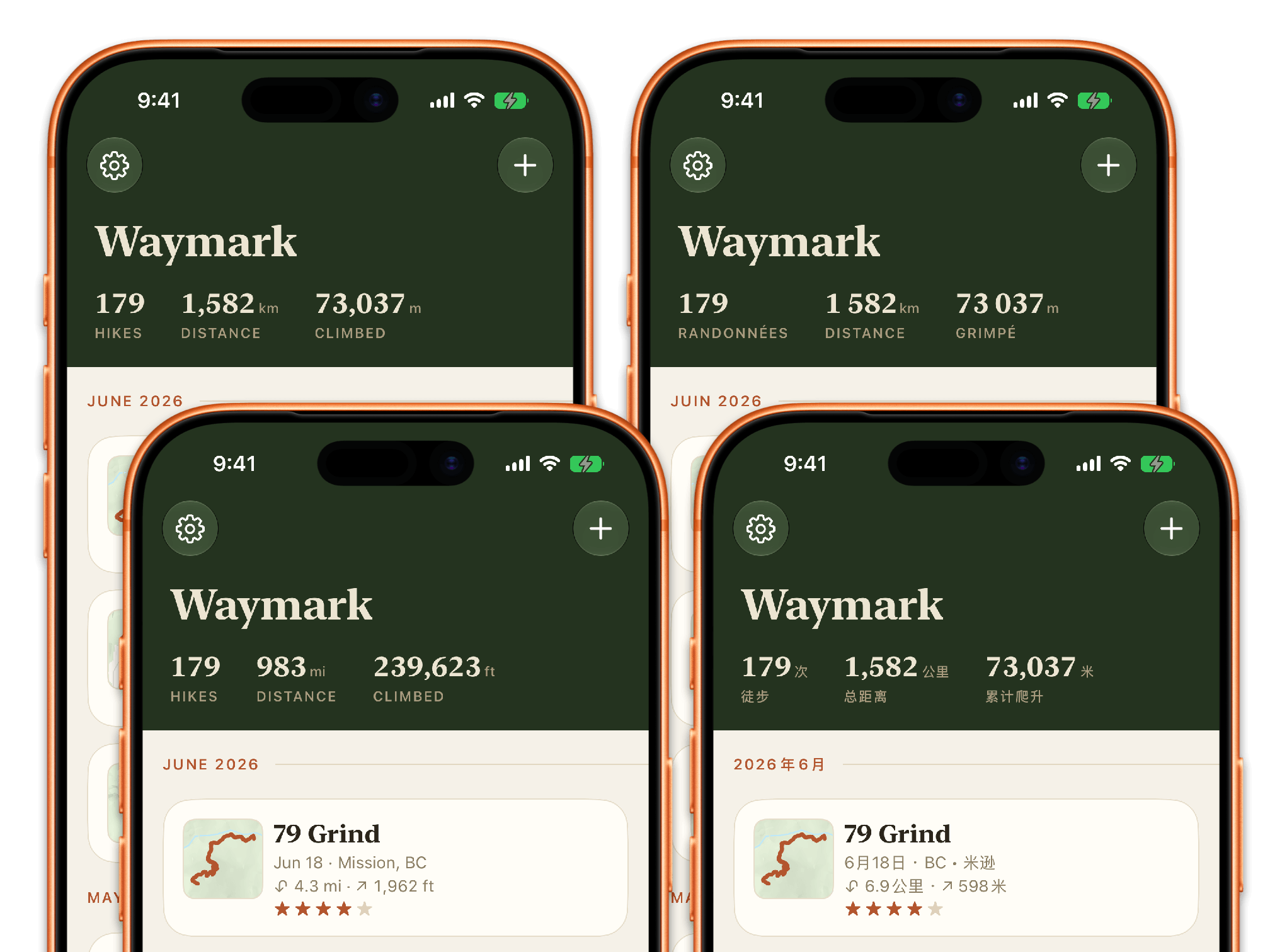
My new app, Waymark, is a hiking journal that is rich in stats and metrics. I want those stats stylized consistently: the number in a large print, and the unit set in a smaller font with a secondary colour. It’s not a hard design problem per se.
But it’s made 10x more complicated when the app is localized. Waymark supports 18 locales: 4 English variants, French, German, Chinese, and Japanese, among many others.
Foundation is the foundation
If you want the app to truly feel “at home”, it’s a no-brainer to adopt Apple’s Foundation framework. Otherwise, you’d be fighting an uphill battle with little things such as the correct number format (with decimal and thousand separators), the local unit to use, as well as the unit’s proper label in that locale.
Here’s a table of the quirks from only a few locales, per my testing on iOS 26:
| Locale | Elevation | Workout Energy | Numbers | Time of Day |
|---|---|---|---|---|
| English (US) | ft (feet) | Cal (kilocalories) | 1,234.56 | 4:35 PM |
| English (Australia) | m (metres) | kJ (kilojoules) | 1,234.56 | 4:35 pm |
| English (Canada) | m (metres) | Cal (kilocalories) | 1,234.56 | 4:35 PM |
| French | m (metres) | kcal (kilocalories) | 1 234,56 | 16:35 |
| Simplified Chinese | 米 (metres) | 千卡 (kilocalories) | 1,234.56 | 16:35 |
| Traditional Chinese (Taiwan) | 公尺 (metres) | 千卡 (kilocalories) | 1,234.56 | 下午4:35 |
When you use the Foundation framework, you get localized plain strings for free.
Elevation is stored in metres and converted by the app itself — metric vs. imperial is a user setting in Waymark (resolved from the device’s region when set to automatic), not something the formatter should second-guess:
func elevation(meters: Double, imperial: Bool) -> String {
	Measurement<UnitLength>(value: meters, unit: .meters)
		.converted(to: imperial ? .feet : .meters)	// 1
		.formatted(.measurement(
			width: .abbreviated,
			usage: .asProvided,	// 2
			numberFormatStyle: .number.precision(.fractionLength(0))))	// 3
}

// "2,454 ft" · "748 m" · "748米" (zh-Hans) · "748 m" (fr — that space is a narrow no-break space)
A few things to unpack here:
- The conversion is ours, driven by the app’s own units preference.
usage: .asProvidedtells Foundation to keep its hands off the unit we chose. The symbol still localizes — Simplified Chinese writes 米, Taiwan writes 公尺 — but the value is no longer converted behind our back.- Elevations read best in whole units; the fraction rule is the app’s, the separators are the locale’s.
Workout energy is the opposite arrangement — hand Foundation kilocalories and let it decide, via the .workout usage:
func energy(kilocalories: Double) -> String {
	Measurement(value: kilocalories, unit: UnitEnergy.kilocalories)
		.formatted(.measurement(width: .abbreviated, usage: .workout))
}

// "428 Cal" (en-US) · "1,791 kJ" (en-AU) · "428 kcal" (fr) · "428千卡" (zh-Hans)
That one usage: argument is what knows Australians count workout energy in kilojoules — matching what Apple Health shows them — while Americans get “Cal” and most of the world gets “kcal”. I would not have wanted to maintain that table myself.
Time of day is a one-liner, with one twist — Waymark formats a hike’s clock in the hike’s own time zone, so an entry imported from a trip to Japan reads as the time you actually started walking:
func formattedTimeOfDay(_ date: Date) -> String {
	date.formatted(Date.FormatStyle(date: .omitted, time: .shortened, timeZone: timeZone))
}

// "4:35 PM" · "4:35 pm" (en-AU) · "16:35" (fr) · "下午4:35" (zh-Hant)
That’s correctness nailed. The rest is about stylizing the string, so that they look appealing, too.
Stylizing formatter strings
Every format style above has an .attributed variant (since iOS 15): instead of a plain String, it returns an AttributedString whose runs are tagged with what they mean — this run is the value, that run is the unit. Waymark’s stat views loop over the runs and style each part:
var string = elevation
	.converted(to: imperial ? .feet : .meters)
	.formatted(.measurement(
		width: .abbreviated,
		usage: .asProvided,
		numberFormatStyle: .number.precision(.fractionLength(0)))
	.attributed)	// 1

for run in string.runs {
	if run.measurement == .value {	// 2
		string[run.range].font = .statFigure
		string[run.range].foregroundColor = figureColor
	} else if run.measurement == .unit {
		string[run.range].font = .statUnit
		string[run.range].foregroundColor = unitColor
	} else {
		string[run.range].font = .system(size: 8)	// 3
	}
}
A few things to unpack here:
- Appending
.attributedto the format style is the whole opt-in. - There is no parsing, and no assumption about ordering or spacing. Whether the unit is “ ft” after a space, or 米 glued directly onto the figure, the
.unitrun is the unit — the same loop handles every locale in the table above. - The run that is neither value nor unit is the separator space between them. Giving it a tiny font tightens the gap between the big figure and the small unit — a subtle kerning trick with no layout code. In Chinese there’s no separator run at all, and the loop simply never hits that branch.
SwiftUI’s Text takes an AttributedString directly, so the styled result drops straight into the view. VoiceOver support is free.
One more trick this unlocks: sometimes you need the bare unit symbol on its own — Waymark’s manual-entry form labels its distance field with “km” or “mi”. The old-school MeasurementFormatter.string(from: Unit) returns display names like “metre” for some units, per my testing. Formatting a throwaway measurement and extracting the .unit run gives the properly localized symbol every time:
func unitLabel(_ unit: UnitLength) -> String {
	let attributed = Measurement(value: 1, unit: unit).formatted(
		.measurement(width: .abbreviated, usage: .asProvided).attributed)
	for run in attributed.runs where run.measurement == .unit {
		return String(attributed[run.range].characters)
	}
	return unit.symbol	// unreached in practice
}
Bonus point: classifier words
Classifier words don’t exist in English, or in many Latin-based languages. But they do exist in Chinese, Japanese and Korean. You can say “3 hikes”, “5 books”, and “7 cows” and those are perfectly fine. But in Chinese, you’d say “3次徒步”, “5本书” and “7头牛”. Those are classifier words that precede the noun they’re describing. A close English analogy is when you describe uncountable nouns, for example, “a cup of water” or “3 pieces of paper”.
For the truly localized app, you’d pay close attention to the stats when you count items. Waymark subtly displays “次” (Chinese) or “回” (Japanese) beside the total-hikes figure — set in the same small secondary style as a real unit, because to a Chinese or Japanese reader, that’s exactly what it is.
Foundation can’t produce this one; it comes from the string catalog. The trick is that the English “translation” of the classifier is a single space:
let unitText = String(
	localized: "shared.stats.label.hike_unit",
	comment: "Single space for most Latin locales; the counting unit for Chinese/Japanese/Korean locales. E.g. '次' for Chinese or '回' in Japanese")
	.trimmingCharacters(in: .whitespacesAndNewlines)	// English trims to empty

if !unitText.isEmpty {
	var unitString = AttributedString(unitText)
	unitString.font = .statUnit
	unitString.foregroundColor = unitColor
	return figureString + spaceString + unitString	// styled like any Foundation-made unit
} else {
	return figureString	// English: just the big number, "179"
}
The string catalog itself decides whether a classifier exists — the code never checks the locale. A future Korean pass just fills in “번의” and the stat view is already ready for it.
Parting thoughts
Localized measurements split cleanly into three layers:
- Correctness is Foundation’s job. Separators, unit symbols, kilojoules for Australians —
Measurement, the rightusage:, andDate.FormatStylecover the entire quirks table with no locale checks in your code. - Styling is a loop over
.attributedruns. The formatter tells you which characters are the value and which are the unit; you never parse, and the same 15 lines style every locale. - The last mile is yours. Classifier words are beyond any formatter’s reach, but a string-catalog entry — styled to look like Foundation made it — closes the gap.
I hope you’ve found this article helpful. Did I miss anything? Let me know!